Payment gateway integration is basically the point where your website stops being just a website, and starts making you money.
Because without it, people can come in, look around, even love what you’re offering… but when it’s time to actually pay, they can’t. And that’s where you lose them.
We’ve seen this happen a lot with early-stage businesses. You put all this effort into building the site, getting the design right, setting everything up… and then payments feel like this whole separate, complicated thing. It starts to feel technical, confusing, even a bit risky, so it gets delayed.
But honestly, it’s not that complicated. Once you break it down, it’s pretty straightforward. You just need to understand what’s going on behind the scenes and make sure the checkout stays simple and smooth. That’s really what matters.
What a Payment Gateway Actually Does
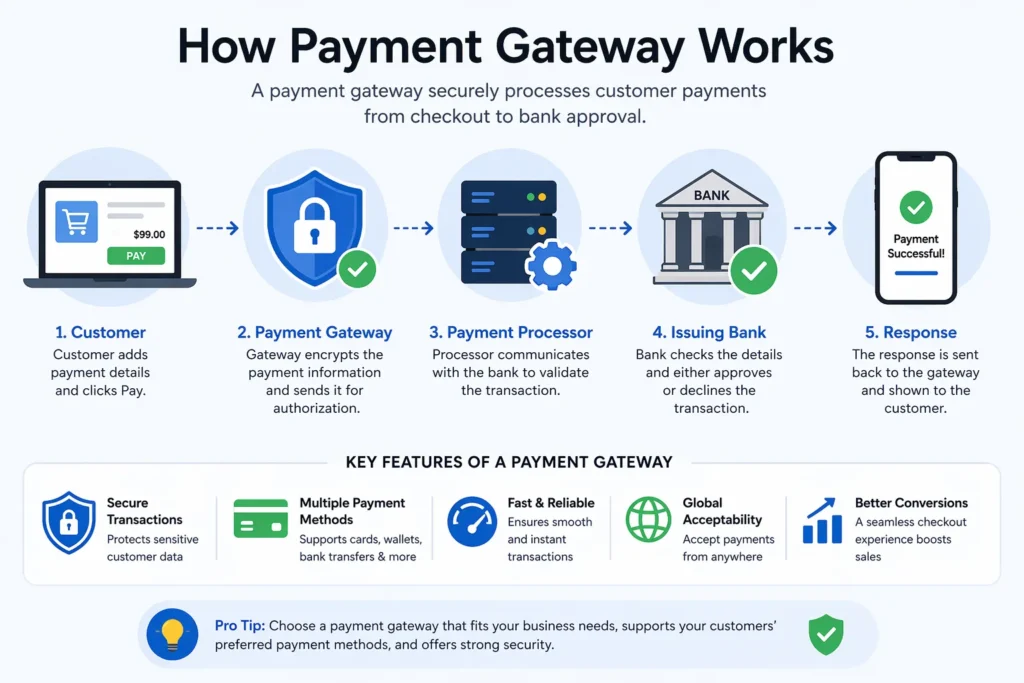
Think of a payment gateway as the middle layer between a customer and the bank. It takes the payment details, secures them, sends them for approval, and brings back a response within seconds.
A lot of people mix up payment processor vs payment gateway, so here is the simple difference:
| Component | Role |
| Payment Gateway | Handles the checkout and data security |
| Payment Processor | Transfers the money between banks |
Both are required. One handles the experience, the other handles the movement of money.
Types of Payment Gateway Setups
Different businesses choose different approaches depending on how much control they want.
Hosted Checkout
- Redirects users to another page
- Quick to set up
- Less control over branding
On-Site Checkout
- Everything happens on the website
- Better experience for users
- Requires stronger setup
API-Based Setup
- Full control over design and flow
- Ideal for scaling businesses
- Used in advanced ecommerce payment gateway integration
Most growing businesses eventually move toward API-based setups because they allow flexibility.
Step-by-Step Process
Step 1: Start With Clarity
Before jumping into tools, understand:
- Who is buying
- What payment methods they prefer
- Whether payments are one-time or recurring
- Where customers are located
This shapes the entire online payment gateway integration process.
Step 2: Choose the Right Gateway
Not every gateway works the same way. Some are easier but limited, others are flexible but require effort.
Look for:
- Security standards
- Easy documentation
- Support for multiple payment methods
- Reliable performance
A strong payment gateway for ecommerce website supports both current needs and future growth.
Step 3: Set Up a Merchant Account
This is where the money actually goes.
- Connect a business bank account
- Verify identity
- Complete required compliance
Without this step, credit card payment integration will not work.
Step 4: Connect the Gateway
This is where payment gateway integration actually begins.
- Use plugins for platforms like Shopify or WooCommerce
- Use APIs for custom-built websites
Plugins are faster. APIs give more control.
Step 5: Build the Checkout Flow
This is where most businesses either win or lose customers.
A checkout should feel simple.
Key parts:
- Clear order summary
- Easy payment form
- Minimal steps
- Instant confirmation
A smooth payment gateway in ecommerce setup reduces drop-offs significantly.
Step 6: Add Security
Security builds trust.
- SSL certificates
- Data encryption
- Tokenization
- Fraud detection
These are non-negotiable for any serious ecommerce payment solutions USA setup.
Step 7: Test Everything
Before going live:
- Test successful payments
- Test failures
- Check refund handling
- Use sandbox mode
Testing ensures payment gateway integration works in real conditions, not just in theory.
Step 8: Go Live and Observe
After launch:
- Track payment failures
- Watch user behavior
- Improve weak points
Payment gateway integration does not stop after setup. It improves over time.
Common Problems That Show Up
Complicated Checkout
Too many steps push people away.
Slow Pages
Speed affects decisions more than expected.
Limited Payment Options
Users expect flexibility.
Poor Error Handling
If something fails, users should know what to do next.
Ignoring Mobile Users
Most users are on phones now.
Fixing these issues improves how payment gateway integration performs.
What Payment Methods Should Be Included
Customers expect options.
- Cards
- Digital wallets
- Bank transfers
- Buy now pay later
A flexible payment gateway for ecommerce website leads to better conversions.
Cost Breakdown
| Cost Type | Meaning |
| Setup Fee | Initial setup cost |
| Transaction Fee | Percentage per sale |
| Monthly Fee | Platform charges |
| Chargeback Fee | Dispute handling cost |
Understanding these helps in choosing the right payment gateway for small business USA.
How to Improve Performance
Make Checkout Faster
Speed directly impacts conversions.
Reduce Steps
Less friction leads to more completed payments.
Allow Guest Checkout
Not everyone wants to create an account.
Optimize for Mobile
Mobile-first is the reality now.
All of this improves payment gateway integration results.
What Is Changing in 2026
Payments are becoming more seamless.
- One-click checkout
- AI fraud detection
- Faster approvals
- Less visible payment steps
Staying updated keeps payment gateway integration competitive.
Frequently Asked Questions
What is payment gateway integration and why is it important?
payment gateway integration connects a website with banking systems so payments can be processed securely. It ensures customers can complete transactions smoothly, which directly impacts revenue, trust, and business growth online.
How long does it take to integrate a payment gateway?
It depends on the setup. Simple platforms can complete ecommerce payment gateway integration in a few hours, while custom solutions may take days or weeks depending on features, testing, and complexity.
What is the difference between payment processor vs payment gateway?
A gateway handles the front-end payment process and security, while a processor moves funds between banks. Both are required to complete transactions in ecommerce payment solutions USA environments.
Is payment gateway integration difficult for beginners?
It is manageable with the right tools. Many providers offer simple plugins that make payment gateway for small business USA setups easier without requiring deep technical knowledge.
Is credit card payment integration safe?
Yes, when proper security measures like encryption and tokenization are used. These ensure that sensitive data is protected and transactions are processed securely.
What payment methods should a website offer?
A mix of cards, wallets, and flexible payment options works best. This improves the performance of any payment gateway for ecommerce website and increases completed transactions.
Do custom websites require API-based integration?
Most custom platforms benefit from online payment gateway integration using APIs because it provides full control over the checkout experience and advanced functionality.
How should payment gateway integration be tested?
Use sandbox environments to simulate real transactions, including successful payments and failures. This ensures everything works correctly before going live.
What happens if a payment fails?
The system returns an error and stops the transaction. A well-designed payment gateway in ecommerce setup allows users to retry easily without losing their progress.
How can conversion rates improve after integration?
Faster checkout, fewer steps, better mobile experience, and multiple payment options all help improve performance and make payment gateway integration more effective.